
Today I am thrilled to announce the official release of NestJS 12. This is the most significant platform update in years — spanning the framework, the CLI, the default tooling, and the documentation. There are far too many changes to list here, but let's take a high-level look at some of the most exciting ones!
In case you're not familiar with NestJS, it is a TypeScript Node.js framework that helps you build enterprise-grade efficient and scalable Node.js applications.

Published by Edewaa Foster
Let's dive right in! 🐈
NestJS is now ESM-first
The headline change in v12 is that the NestJS core packages now ship as ESM.
This has been one of the most requested changes in the history of the project, and it finally aligns Nest with the direction the entire Node.js and TypeScript ecosystem has been moving toward for years.
‼️ The important nuance is that this transition is optional for your application code. Modern Node.js supports require(esm), which means existing CommonJS projects can upgrade to the v12 packages and keep working without a rewrite. ‼️
To make the upgrade itself as smooth as possible, the CLI ships with a brand-new upgrade flow:
# If you installed the CLI globally, run:$ npm i -g @nestjs/cli@latest @nestjs/schematics@latest$ npm i @nestjs/cli@latest @nestjs/schematics@latest$ nest upgradeRunning this command will update your Nest dependencies while preserving your existing module format. Note that nest upgrade does not convert your source files to ESM — your CommonJS project stays a CommonJS project, and everything keeps working thanks to require(esm). Nobody is being forced into ESM overnight.
If you do want to move your own project to ESM as well, that migration is entirely optional — we cover what it involves at the bottom of this article.
CJS or ESM? The CLI lets you choose
When you generate a new project with nest new, the CLI will now ask whether you want a CommonJS or an ESM project — and the default tooling differs depending on that choice:
- new ESM projects use Vitest and oxlint by default
- the CJS schematic continues to generate Jest and eslint-based projects
This split is intentional. It gives teams a way to adopt the modern stack on new services while keeping existing codebases untouched. Existing Jest-based projects can continue to use Jest without any forced migration — the @nestjs/testing package remains runner-agnostic, so it works the same regardless of which test runner you pick.
Rspack replaces webpack
Webpack-centric workflows are now deprecated in the Nest CLI, and Rspack becomes the default bundler for monorepos. The --webpack and --webpackPath flags are marked as deprecated, and a new --rspackPath flag lets you point at a custom Rspack configuration.
If your setup depends on webpack-specific plugins or behavior, this is the area you should evaluate first when upgrading.
One point worth calling out:
tscremains the default compiler for standard projects. The build pipeline is evolving, but the TypeScript compiler is not going away.
The CLI also picked up a number of smaller quality-of-life improvements along the way, including new --emit-declarations, --no-type-check, --silent, and --parallel options for nest build and nest start, a new includeLibraryAssets property in nest-cli.json, and a brand-new nest deploy command.
Standard Schema support
One of the most interesting framework-level additions in v12 is first-class Standard Schema support.
Route parameter decorators such as @Body(), @Query(), and @Param() now accept a schema option, which takes any Standard Schema compatible object. This opens the door to validation flows built on libraries like Zod, Valibot, and ArkType:
@Post()create(@Body({ schema: createCatSchema }) createCatDto: CreateCatDto) { return this.catsService.create(createCatDto);}Or with Zod directly in the decorator:
@Get(':id')findOne(@Param('id', { schema: z.coerce.number().int().positive() }) id: number) { return this.catsService.findOne(id);}Under the hood, this is powered by the new StandardSchemaValidationPipe, and the same idea extends to the response side with the StandardSchemaSerializerInterceptor, making schema-driven request and response handling consistent across your application.
The @nestjs/config package follows the same direction: the validationSchema option now accepts any Standard Schema compatible object instead of being Joi-only. If you want to keep using Joi, that's perfectly fine too — just make sure to upgrade to Joi v18+ and move library-specific settings to validationOptions.libraryOptions.
Just to be clear, this is not a replacement for
class-validator! It is an additional option that allows teams to use a schema-first approach without having to rely on decorators or class-based validation. Our documentation still suggestsclass-validatoras the default for most use cases, but the new schema support is a welcome addition for teams that prefer a different approach.
Structured logging
The ConsoleLogger now treats plain objects passed as additional arguments as structured parameters:
this.logger.log('User signed in', { userId: 1, method: 'oauth' });In JSON mode, these parameters are nested under a params key by default, or spread onto the root object when you enable the flattenParams option — which makes the built-in logger play much nicer with log aggregation platforms without any third-party wrappers.
Machine-readable error codes
HttpExceptionOptions now accepts an errorCode property that gets serialized into the error response:
throw new BadRequestException('Invalid payload', { errorCode: 'CATS-0001',});This gives API consumers a stable, machine-readable identifier to program against, instead of having to parse human-readable error messages.
Route conflict diagnostics
The core router can now detect shadowed and duplicate routes for you. Two new application options, routeConflictPolicy and routeResolutionStrategy, let you decide how the framework should react when one route unintentionally shadows another — a class of bugs that has historically been painful to track down in larger applications.
Native observability with @nestjs/observe
NestJS 12 ships alongside the new official @nestjs/observe SDK, which integrates natively with the framework through the new instrument application option. It hooks into Nest's own request lifecycle — controllers, interceptors, resolvers, queue consumers — rather than bolting a generic Node.js agent onto the process. Once enabled, it automatically instruments incoming requests, background jobs, errors, logs, and traces, with no exporter to configure and no schema to design.
The integration boils down to creating the module once and passing the matching instrument hook to NestFactory.create():
// app.module.tsexport const { ObserveModule, ObserveInstrument } = createObserveModule();@Module({ imports: [ ObserveModule.forRoot({ appKey: process.env.OBSERVE_APP_KEY, appSecret: process.env.OBSERVE_APP_SECRET, serviceId: 'cats-app', }), ],})export class AppModule {}// main.tsconst app = await NestFactory.create(AppModule, { instrument: ObserveInstrument,});Once the application receives traffic, everything starts appearing in your project's dashboard within moments:
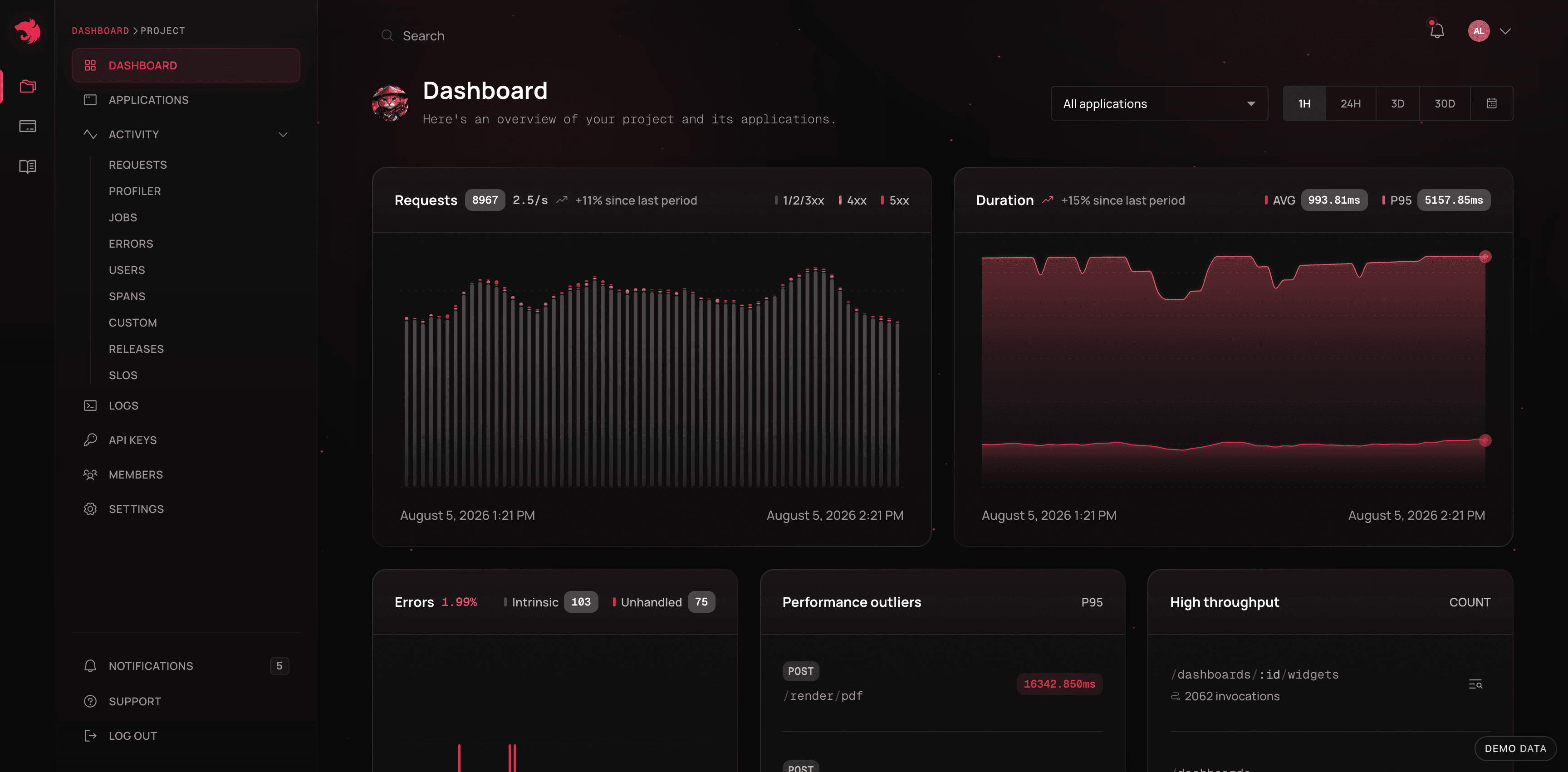
The NestJS Observe project dashboard
Distributed tracing is built in as well — a single user action that fans out across multiple services shows up as one correlated trace waterfall:
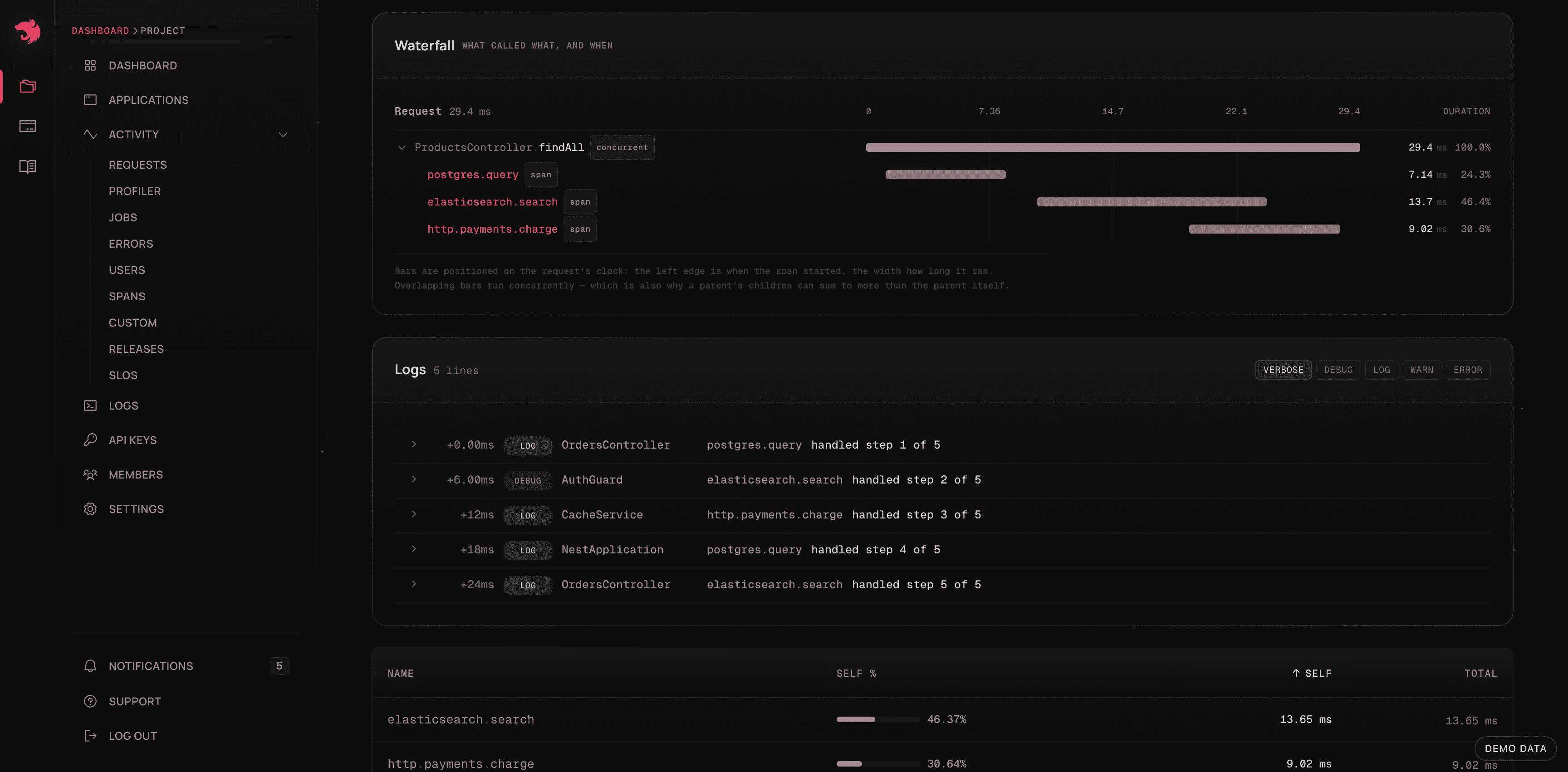
Trace waterfall in NestJS Observe
To learn more, check out the new Observability section in the official documentation.
Microservices improvements
As with every major release, the microservices package received a lot of attention:
- NATS v3 support: the underlying
natspackage has been replaced with the new official@nats-io/transport-nodeclient. Note that deserializers now receive the full message object (read the payload viamsg.json()). - Kafka regexp patterns:
@MessagePattern()and@EventPattern()now accept regular expressions, so a single handler can subscribe to multiple topics. - Pre-request hooks: run custom logic right before a message handler is invoked.
- gRPC exception filters: a dedicated exception filter with status-specific exception classes, bringing gRPC error handling in line with the HTTP experience.
GraphQL and WebSockets
On the GraphQL side, GraphiQL is now the default IDE (the legacy playground option is deprecated), and support for the long-unmaintained subscriptions-transport-ws has been removed in favor of graphql-ws.
WebSocket gateways also gained two long-awaited capabilities: request-scoped gateways are now supported, and disconnect handlers finally receive the disconnect reason.
Some other valuable updates
- Express-based applications now support graceful shutdown, draining in-flight requests before the process exits.
- The termination behavior when lifecycle hooks reject has been improved, and hooks are now called following the component hierarchy. See the migration guide for details.
PipeTransformsignatures are now more type-safe, andArgumentMetadataaccepts a generic parameter.- NestJS 12 requires Node.js v20.19+ or v22.12+ to run your applications.
- And many more! Check out the full release notes here
A brand-new nestjs.com (and docs!)
NestJS 12 also arrives together with the first major redesign of the NestJS website in roughly nine years — cleaner, faster, and easier to navigate.

Design by Jakub Staron
The refresh isn't limited to the landing page either — the official documentation received the same design treatment, with a cleaner reading experience and improved navigation across the (ever-growing) documentation surface.
While the redesign is separate from the technical changes landing in the framework itself, it represents the same broader direction: modernizing the project while keeping the core values that made NestJS popular — productivity, scalability, and a structured approach to building backend applications.
Migration from Nest v11
Upgrading is easier than ever. Install the latest CLI and run the new upgrade command:
# If you installed the CLI globally, run:$ npm i -g @nestjs/cli@latest @nestjs/schematics@latest$ npm i @nestjs/cli@latest @nestjs/schematics@latest$ nest upgradeThe nest upgrade command updates your Nest dependencies while preserving your project's existing module format (CommonJS or ESM). For everything else — lifecycle hook ordering, NATS imports, Joi v18, custom pipes — refer to the detailed guidelines available here. Also, make sure to get rid of all deprecation messages that may appear in your console.
Moving your own project to ESM (optional)
As mentioned earlier, upgrading to v12 does not require converting your project to ESM — and nest upgrade intentionally won't rewrite your source files. But if you do want to go all-in on ESM, the migration comes down to a few well-defined steps:
- add
"type": "module"to yourpackage.json - set
"module": "nodenext"and"moduleResolution": "nodenext"in yourtsconfig.json - add explicit
.jsextensions to your relative imports (e.g.,'./app.module.js') - replace
__dirnamewithimport.meta.dirname
// main.ts (ESM project)import { NestFactory } from '@nestjs/core';import { AppModule } from './app.module.js'; // 👈 note the explicit extensionconst app = await NestFactory.create(AppModule);await app.listen(3000);Take your time with this one — there's no deadline. CommonJS projects remain fully supported, and you can migrate service by service whenever it makes sense for your team. The migration guide walks through the full process.
Enjoy v12!
We're excited to see how you use the latest version of NestJS.
Make sure to follow Nest on X @nestframework to stay up to date with all the latest announcements!
Enterprise Consulting & Support
Our official NestJS Enterprise Consulting includes a broad range of services to empower your team.
We work alongside you to meet your deadlines while avoiding costly tech debt. Challenging issue? We've got you covered.
- Providing technical guidance & architectural reviews
- Mentoring team members
- Addressing security & performance concerns
- Performing in-depth code reviews
- Long-term support (LTS) & upgrade assistance
Our goal is to help you get to market faster. Nest core team members will help you utilize best practices and choose the right strategy for unique goals. You can learn more on the enterprise.nestjs.com.
Support the NestJS Project
Nest is an MIT-licensed open source project with its ongoing development made possible thanks to the support by the community and our sponsors. Thank you!
This framework is a result of the long days, sleepless nights, and busy weekends. And we fully rely on the goodness ❤️ of the people. If you want to join them, you can read more here.
Thank you
To all backers, sponsors, contributors, and community, thank you once again! This product is for you. And this is only the beginning of the long 🚀 story.
Become a Backer or Sponsor to Nest by donating to our open collective. ❤
Learn NestJS - Official NestJS Courses 📚
Level-up your NestJS and Node.js ecosystem skills in these incremental workshop-style courses, from the NestJS Creator himself, and help support the NestJS framework! 🐈🚀 The NestJS Fundamentals Course is now LIVE and 25% off for a limited time!
🎉 NEW - NestJS Course Extensions now live!
- NestJS Advanced Concepts Course now LIVE!
- NestJS Advanced Bundle (Advanced Architecture and Advanced Concepts) now 22% OFF!
- NestJS Microservices now LIVE!
- NestJS Authentication / Authorization Course now LIVE!
- NestJS GraphQL Course (code-first & schema-first approaches) are now LIVE!
- NestJS Authentication / Authorization Course now LIVE!